Send the link
Send the exact offer home.
The link carries the customer, vehicle, price, advisor, and next step without asking anyone to rebuild the offer.
Sell cars online
Let a buyer start with live stock or a configured vehicle, continue with a personal offer, and pick up at home without starting again.
Last updated
Start from current stock or a configured vehicle, send the offer, and keep the buyer moving.

The digital showroom takes the buyer from current stock to a chosen vehicle.
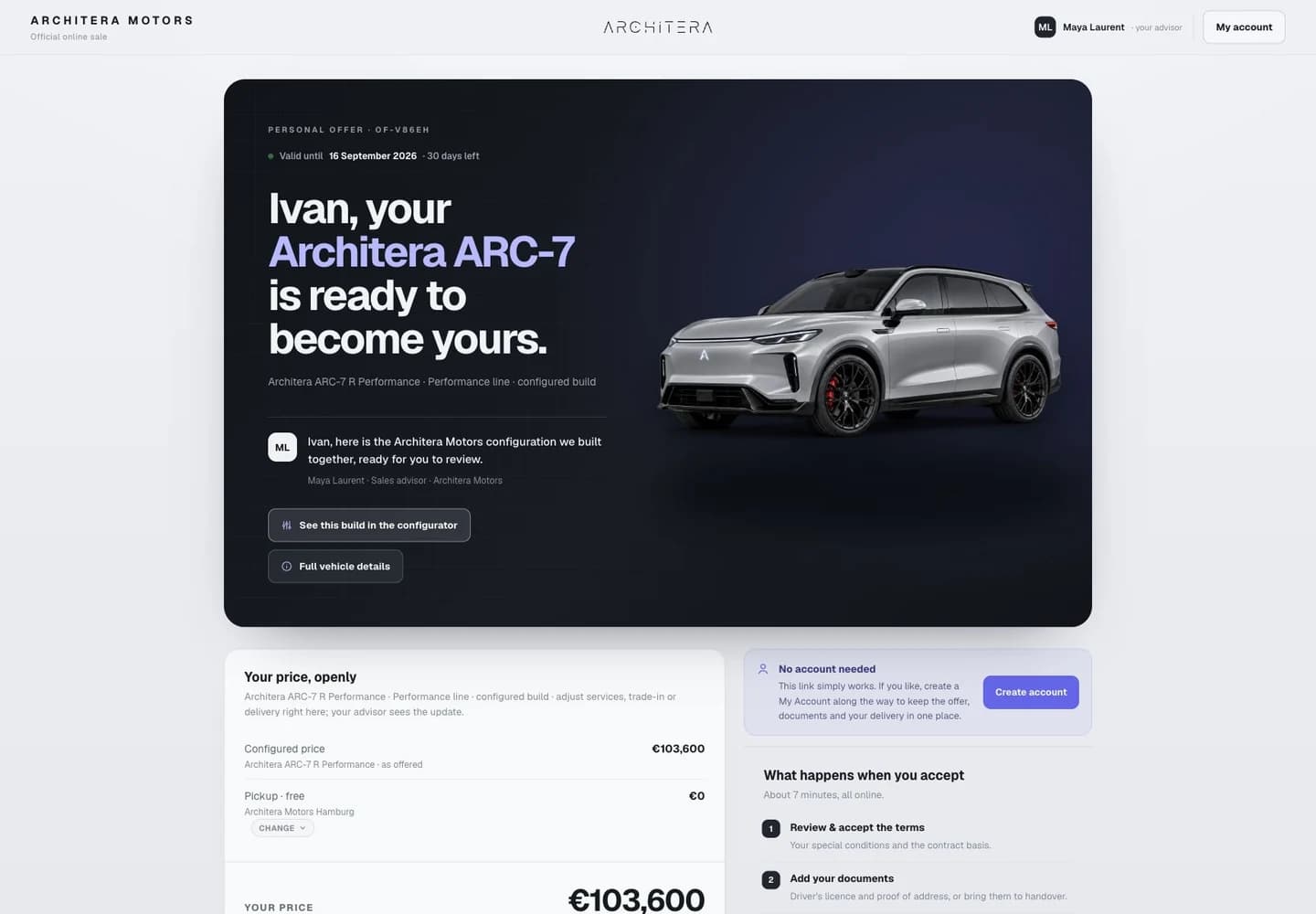
The personal offer keeps the customer's configured vehicle, price, advisor, and next step in one link.

Atlas carries the chosen vehicle into the configured reservation or payment step.
The team chooses a stock car or completes a Forge configuration with the customer, builds the offer, and sends a link. The customer continues at home from the same vehicle and offer.
Send the link
The link carries the customer, vehicle, price, advisor, and next step without asking anyone to rebuild the offer.
At home
The customer can review the same offer and continue into the reservation or checkout route the dealership has enabled.
Atlas is the simplest place to start with current stock. Forge turns a saved build into a personal offer. Cronus answers questions and follows up around that offer.
Atlas stock
Connect a supported inventory feed and open a digital showroom beside the dealership's current website.
Forge configuration
Keep the customer's chosen configuration, price, advisor, and next step together in a personal link.
The customer may start in the showroom and finish at home. The offer should not reset between the two.
A link that loses the vehicle, price, or advisor makes the customer rebuild work the team already completed.
Keep the customer, chosen vehicle, price, advisor, and next step together from the showroom to home.
No. Atlas can launch as a focused digital showroom beside the dealership's current website. A wider website move is a separate decision.
The team builds an offer with the customer in the showroom, sends the exact offer as a link, and lets the customer continue at home. The vehicle, price, and next step stay with the offer.
Atlas publishes current stock and carries a chosen vehicle into the buying path. Forge carries a saved configuration into a personal offer. A dealership can start with Atlas and add Forge where configured vehicles matter.
Yes, when reservation is part of the rollout. Atlas can carry the chosen stock item into the dealership's configured reservation or checkout path.
Atlas can help a buyer search current stock in natural language. Cronus can answer questions, send an approved personal offer, and follow up while it remains open. Your team still controls the vehicles, prices, and routes a customer can complete.
We map the customer path, the AI role, and the team handover.